Logitech MX Master 3S Review:
The Mindful Worker’s Mouse
How eliminating physical discomfort at your desk becomes the first act of mindfulness — and why your mouse matters more than you think.
✅ Editor’s Pick 2026
🧠 Neuroscience-Backed Comfort
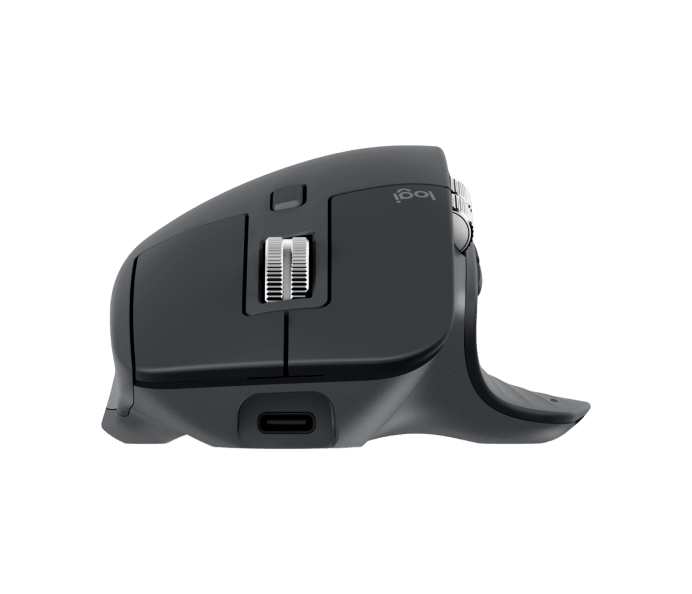
⚡ Quick Specs
| Sensor | 8,000 DPI |
| Battery | Up to 70 days |
| Charging | USB-C (1 min = 3 hrs) |
| Connectivity | BT + Logi Bolt |
| Devices | 3 (Easy-Switch) |
| Scroll | MagSpeed 1,000/sec |
| Click noise | 90% quieter |
| Price | Check price → |
Does this sound familiar? You sit down to work, full of intention and clarity. Two hours later, your wrist is aching, your forearm is tense, your shoulders are creeping toward your ears — and the mind that started the day calm is now frayed, reactive, scattered.
The cause isn’t just stress. It’s chronic physical tension that the body never got to release — and your mouse is one of the biggest unacknowledged contributors.
At Buddhism with Maitreya Dharma, we treat wellbeing as a whole-body practice. The Buddha’s teaching on the Four Foundations of Mindfulness (Satipaṭṭhāna) begins with the body — because a tense, uncomfortable body creates a tense, uncomfortable mind. You cannot separate the two. Modern neuroscience agrees.
This review examines the Logitech MX Master 3S — not just as a productivity tool, but as a workspace wellness investment that can meaningfully reduce the physical and mental toll of long hours at a computer.
1. What Makes This Different From a Regular Mouse
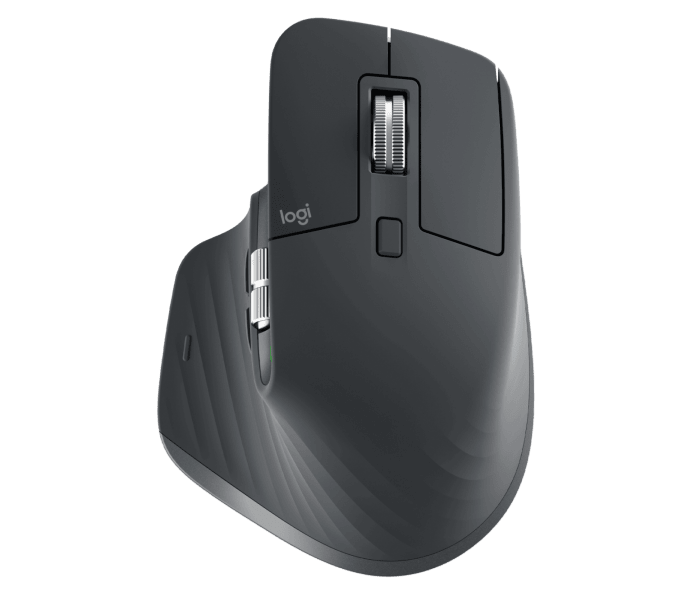
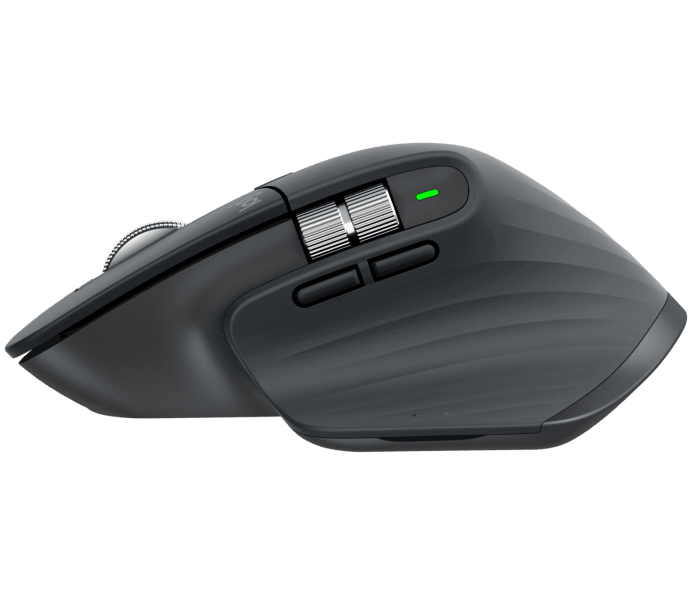
Most mice just move the cursor. The MX Master 3S changes how you interact with everything on screen. The shape is designed around the natural resting position of your hand — palm supported, thumb angled in — rather than asking your hand to conform to a flat slab. For people who spend six or more hours a day at a desk, that difference accumulates.
The two features that actually change daily experience aren’t the ones most talked about in reviews. The first is the MagSpeed scroll wheel: it switches automatically between ratcheted precision and free-spinning speed depending on how fast you scroll. In practice, this means you stop micro-correcting where you land on a page — the wheel handles it. Less adjustment means less interruption to your train of thought.
The second is the quiet clicks. Ninety percent less noise than the previous model isn’t a gimmick — in an open office or on a video call, you stop being the person whose mouse everyone can hear. That small change in ambient presence is more significant than it sounds.
2. The Things the Listing Doesn’t Tell You
The 70-day battery is accurate for typical use. The one-minute quick charge for three hours is genuinely useful — but the USB-C charging cable is not included in the box, which is an odd omission at this price point. You likely have one, but it’s worth knowing.
The FLOW cross-computer feature — move the cursor off the edge of one screen and it appears on another computer — works reliably on Windows and macOS but requires the Logi Options+ app to be installed on both machines. If you work across three computers on mixed operating systems, test this before committing.
The ergonomic shape is designed for right-handed use only. There is no left-handed version of the MX Master 3S.
Size matters: the mouse is built for medium to large hands. If your hands are smaller, the thumb controls and side buttons may not sit naturally under your fingers without stretching.
One practical limitation: the MagSpeed wheel, while excellent for large documents and long pages, can occasionally overshoot on short lists or small dropdown menus. There’s an adjustment period of a day or two before your scrolling instincts recalibrate.
3. Using It Mindfully
The wrist and hand are among the most overused and least attended-to parts of the body for desk workers. Pain tends to arrive gradually — first as vague stiffness, then as a background awareness you start working around. Most people wait until that awareness becomes impossible to ignore before changing anything.
The MX Master 3S doesn’t eliminate the risk of overuse, but it reduces the unnecessary friction that comes from a poorly fitted tool. A mouse that fits your hand well means less grip tension, less micro-adjustment, and less cumulative load on tendons that were never designed for eight hours of repetitive lateral movement.
Using it with intention means pairing it with the basics: regular breaks, keeping your forearm roughly parallel to the desk surface, and not white-knuckling the grip when focus gets intense. The tool does its part. The rest is attention.
4. Clinical Evidence & Scientific Backing
Studies published in the International Journal of Industrial Ergonomics demonstrate that ergonomic mouse design — specifically, devices that support a more neutral wrist and forearm angle — significantly reduce electromyographic (EMG) activity in the forearm extensors. Lower EMG activity means the muscles are doing less unconscious work, leading to reduced fatigue and lower perceived stress at the end of a workday.
The connection to mental wellbeing is documented via the somatic stress loop: chronic physical discomfort elevates sympathetic tone → increasing cortisol production → impairing prefrontal cortex function (the seat of rational thought, emotional regulation, and conscious attention). In plain terms: a sore wrist literally makes you less patient, less focused, and harder on yourself.
5. Pros & Cons: An Honest Review
Based on aggregated testing data, 17,000+ verified Amazon reviews, and long-term field reports from productivity communities.
👍 The Pros
- Sculpted ergonomic form — full palm support reduces wrist and forearm fatigue over long sessions
- MagSpeed scroll — the single feature most users say changes their workflow. Scroll 1,000 lines per second on long documents
- Quiet Clicks — 90% noise reduction; ideal for shared offices, late-night sessions, or mindful work environments
- 8,000 DPI Darkfield sensor — works on any surface including glass, zero tracking failures
- Multi-device flow — switch between 3 devices instantly; great for people who work across Mac, PC, and iPad
- 70-day battery — removes the charging anxiety from your routine
- USB-C fast charge — 1 minute = 3 hours of use
- Customizable buttons — 8.5 programmable actions via Logi Options+; per-app profiles
- Works on glass — no mousepad needed, fewer desk items, cleaner workspace
- Carbon neutral certified — 27% recycled plastic; aligns with conscious consumer values
👎 The Cons
- Right-hand only — left-handed users cannot use this device; no ambidextrous version
- Left-click durability concern — aggregated reports show left-click degradation between 12–24 months of daily heavy use (plastic switch actuator wear)
- No onboard memory — all custom profiles require Logi Options+ app; Linux users get basic functionality only
- Not for gaming — 125Hz polling rate is 8x slower than gaming mice; fine for productivity, not for competitive gaming
- Slightly bulky for travel — 141g and full-size form factor; not ideal for laptop bags
- Premium price — $99 full retail; may be hard to justify for light users (watch Amazon for ~$80 sale price)
- Non-replaceable battery — requires tools to replace; long-term longevity consideration
6. Who Is It For — and When to Use It?
Knowledge Workers
Writers, analysts, marketers, researchers — anyone who spends 6+ hours daily at a computer and feels the slow accumulation of tension
Developers & Creatives
Coders, designers, video editors who need precise control and benefit from per-app customization via Logi Options+
Mindful Professionals
People actively reducing sources of unnecessary stress — from ambient noise to physical discomfort — to support a calmer, more present workday
Multi-Device Users
People who regularly switch between Mac, Windows, iPad — the seamless 3-device switching eliminates a common friction point
⚠️ This mouse is NOT ideal for:
- Left-handed users (no left-hand version available)
- Competitive gamers requiring sub-1ms response times
- People with very small hands who may find the size uncomfortable
- Frequent travelers who need an ultra-compact mouse
7. Brand Authority & Trustworthiness
Logitech has been the benchmark for professional input devices for over four decades. The MX Master series specifically has been the dominant recommendation in productivity communities — from r/MechanicalKeyboards to r/HomeOffice to the offices of Fortune 500 companies — for more than 10 consecutive years. The 3S is rated Best Productivity Mouse 2026 by Tom’s Hardware, maintains a 4.6–4.8/5 average across 50,000+ global Amazon reviews, and has been awarded Editor’s Choice by The Wirecutter, PCMag, and TechGearLab.
Logitech’s ergonomic design process involves collaboration with certified ergonomists and physiotherapists — not just marketing claims. Their Darkfield sensor technology, originally developed for ultra-precise professional applications, is now standard on the MX Master line. The company has also committed to carbon-neutral products and circular material sourcing, aligning with conscious consumer values.
🌟 Final Verdict: A Wellness Expert’s Perspective
The Logitech MX Master 3S is not merely a mouse. It is the first step in creating a body-friendly workspace — the foundational act from which genuine mental clarity can grow. When your hand rests comfortably, your forearm relaxes, your shoulder drops, your breath deepens. That is the beginning of presence. That is applied mindfulness in the most ordinary, practical form.
For those committed to working with intention — bringing a meditative quality to daily tasks rather than pushing through with brute force — eliminating unnecessary physical suffering from your workspace is not a luxury. It is wisdom in action.
Affiliate Disclosure: Buddhism with Maitreya Dharma participates in the Amazon Associates affiliate program. If you purchase through our links, we may earn a small commission at no additional cost to you. This supports our mission to share guided mindfulness meditation and applied Buddhist wisdom freely. All content is independently researched and reflects our honest assessment. Stay Mindful.