Kinesis Advantage360 Review: Is a Contoured Split Keyboard Worth the Learning Curve?
For anyone already dealing with wrist, forearm, or hand discomfort from typing — a deeply unconventional keyboard built around decades of posture research, not marketing claims.
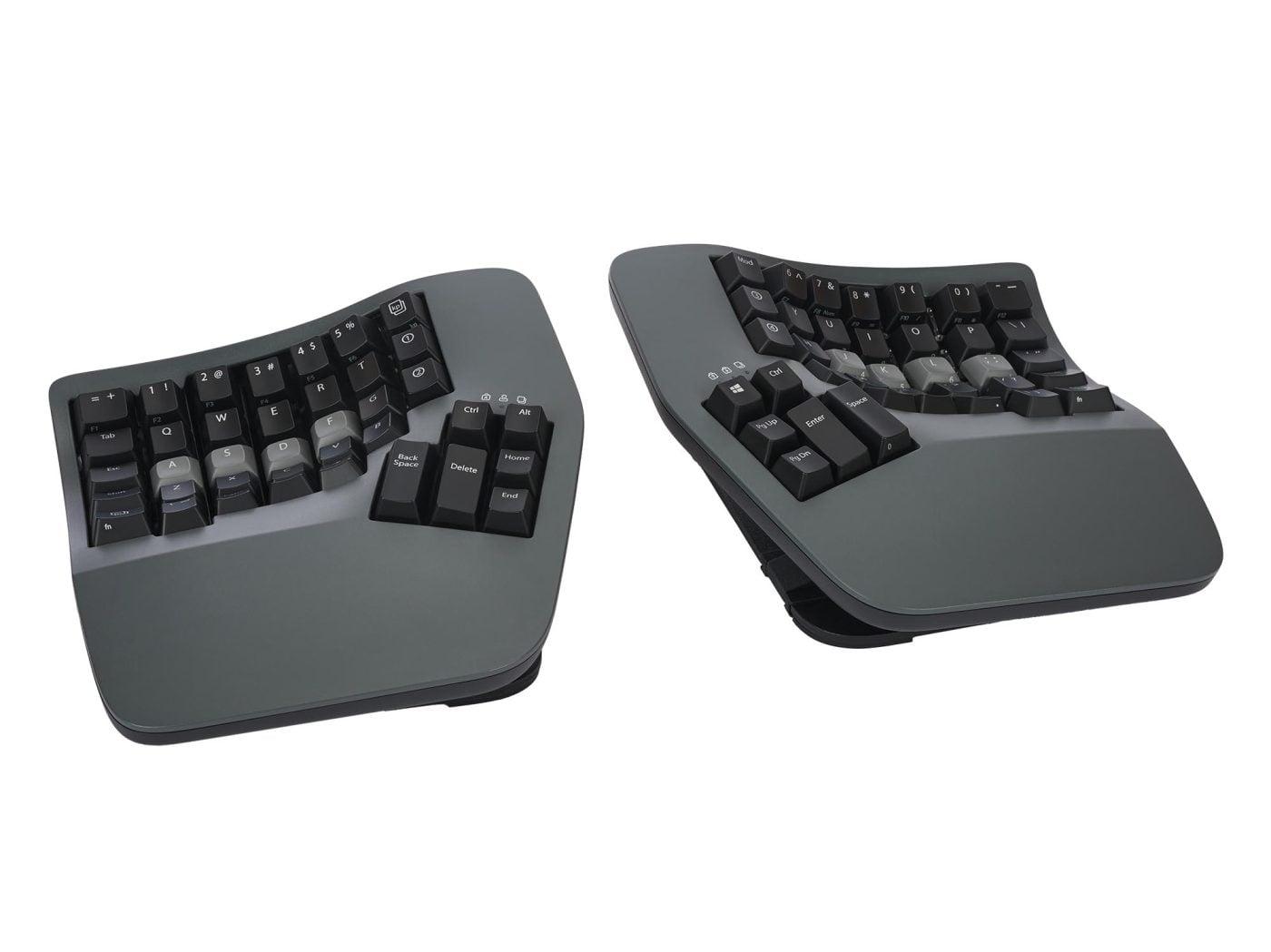
⌨️ Kinesis Advantage360 — Contoured Split Keyboard
Image © Kinesis — Used for editorial review purposes
⚡ Quick Specs
| Layout | Split, contoured concave wells |
| Switches | Gateron mechanical (tactile/quiet) |
| Tenting | 3 adjustable heights |
| Connectivity | USB-C (SmartSet model) |
| Programmable | 9 onboard profiles, 5 layers |
| Rating | 4.3★ (370+ ratings) |
Why Wrist Angle Matters More Than People Think
A standard flat keyboard forces your wrists into 10–15° of ulnar deviation (bending toward your pinky) and roughly 20° of extension while typing. Held for hours a day, that posture is a recognized risk factor for repetitive strain injuries, including carpal tunnel syndrome.
1. What Makes This Different From a Basic Split Keyboard
Many “ergonomic” keyboards just angle the two halves slightly apart. The Advantage360 goes considerably further: concave key wells shaped to your fingers’ natural reach, independent tenting to address forearm rotation, and an orthogonal (non-staggered) key layout — addressing several postural risk factors at once rather than just wrist angle alone.
2. The Things the Listing Doesn’t Tell You
The adjustment period is real and often understated in marketing copy — typing speed typically drops for the first one to three weeks. The fully contoured, orthogonal layout means muscle memory from a standard keyboard doesn’t transfer directly. It’s also a large, non-portable setup, and the price puts it well above most “ergonomic” keyboards sold as a light upgrade rather than a serious intervention.
3. Using It Mindfully
Slow down on purpose at first — chasing your old typing speed on day one is how people give up before the ergonomic benefit shows up. Set the tenting angle before judging the keyboard, since a flat, untented Advantage360 doesn’t deliver the same forearm benefit the research is measuring. And notice tension, not just speed — the point of switching is less strain by the end of a workday, so track that rather than words per minute.
4. Clinical Evidence & Scientific Backing
In a study of 90 experienced office workers at Marquette University, researchers Richard Marklin, Guy Simoneau, and John Monroe found that properly set-up split keyboards reduced mean wrist ulnar deviation from 12° down to within 5° of a neutral position, compared to a conventional keyboard (Marklin, Simoneau & Monroe, 1999, Human Factors). The mechanism is straightforward: separating the two halves lets each hand type at the angle it would naturally rest at. The Advantage360’s added tenting and contouring target two further factors — forearm pronation and finger reach — that the same body of research also flags as contributing to strain.
5. Pros & Cons: An Honest Review from the Global Community
Synthesized from hundreds of verified Amazon ratings and independent ergonomics-focused keyboard reviews.
👍 The Pros (Benefits)
- Genuinely reduces wrist and forearm strain once the adjustment period is complete
- Fully programmable with 9 onboard profiles and 5 layers, no software required for daily use
- Well-built mechanical switches rated for tens of millions of presses
- 3-year warranty and US-based tech support
👎 The Cons (Limitations)
- Real adjustment period — one to three weeks of reduced typing speed
- High price relative to standard or lightly-split keyboards
- Large, non-portable footprint compared to compact keyboards
6. Who Is It For — and When to Use It?
Best fit: anyone who already has wrist, forearm, or hand discomfort from typing and is willing to spend two to three weeks re-learning their typing feel.
Less ideal fit: anyone who types only occasionally, or isn’t willing to tolerate a real adjustment period — a simpler split or tented keyboard may be a gentler entry point.
7. Brand Authority & Trustworthiness
Kinesis has focused exclusively on ergonomic keyboard design since 1991, longer than most competitors have existed, and the Advantage line specifically addresses the same risk factors — ulnar deviation, wrist extension, forearm pronation — that show up consistently across decades of independent ergonomics research, rather than inventing new marketing terminology for old problems.
🌟 Final Verdict: A Wellness Expert’s Perspective
The ergonomic case for a split, contoured keyboard is genuinely well-supported by decades of posture research — this isn’t a marketing claim invented by one brand.
The Advantage360 is one of the more committed implementations of that research, which is exactly why it demands patience most keyboards don’t.
Affiliate Disclosure: Buddhism with Maitreya Dharma participates in the Amazon Associates affiliate program. If you purchase through our links, we may earn a small commission at no additional cost to you. This supports our mission to share guided mindfulness meditation and applied Buddhist wisdom freely. All content is independently researched and reflects our honest assessment. Stay Mindful.